
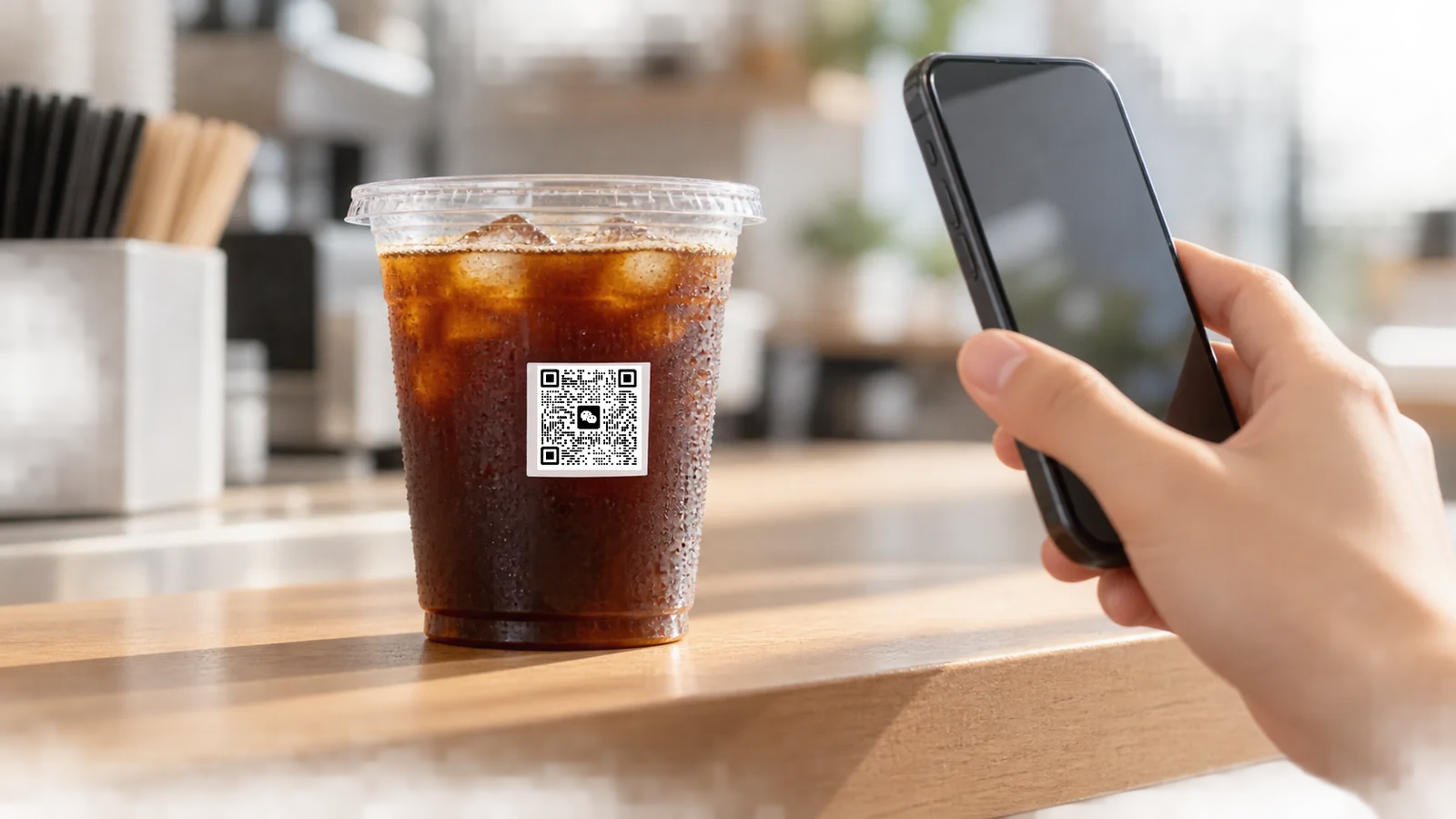
Quick Summary
- Print QR codes on plastic cups with the right size, quiet zone, contrast and placement. Use filled-cup scan tests before approving bulk production.
To print a QR code on plastic cups, confirm the destination link and exact cup first. Generate the code, set its physical size and quiet zone, then agree on the background, position and print construction with the supplier. Approve a printed sample with the intended drinks, using representative phones and realistic conditions. Keep separate records of whether the code is recognised and whether it opens the correct page.
A clear cold-drink cup presents a particular challenge: the drink sits directly behind the printed pattern. A code that reads from a PDF can behave differently over dark coffee, across a tapered sidewall or beneath condensation. These are design and approval questions to resolve before ordering the full print run.
The approval rule: tie QR-code approval to the exact printed cup, artwork revision and intended use conditions. A successful scan from the design file is an early check; the filled sample is the practical approval reference.
This guide covers ordinary website and campaign QR codes intended for consumer phones. Retail checkout codes using GS1 identification have additional requirements. Where GS1 guidance is referenced below, its packaging and print-quality principles inform the discussion; its retail application specifications are not presented as universal requirements for a café menu code.
Start With the Destination and the Exact Cup
Decide what the customer should reach: a menu, loyalty sign-up, campaign page or product information. Open that destination on a phone before preparing the artwork. Check the language, loading behaviour and the action the customer is expected to take.
Static and Dynamic Links: Decide Who Maintains the Destination
The data printed in a QR symbol stays fixed. A direct URL can lead to a page whose content is maintained over time. A managed redirect can keep the printed URL unchanged while its destination changes; this is the mechanism commonly sold as a dynamic QR code. GS1 also describes redirect-based updates without changing the symbol on the package. [6]
For a cup program, assign ownership of the domain, redirect and destination page. Confirm what happens when a promotion ends or a service subscription changes. A short, brand-controlled URL can also reduce unnecessary encoded text. Recheck the generated symbol after any URL change, because its module count may change. [4]
Use the Cup's Production Template
Select the exact variant from the PET cold cup range or PLA cold cup range before fixing the layout. Material names and nominal capacity do not establish a printable surface: the supplier needs the actual cup model, body profile and proposed code position.
Provide the QR artwork at its intended physical size, including the quiet zone. Ask the printer to review module reproduction, ink coverage and any white background on that particular cup. The custom cup printing and artwork guide covers the wider file, template and proof handoff.
Also distinguish one campaign code repeated on every cup from a different code on each cup. Individual serialisation requires a suitable variable-data production route and data controls; it should be confirmed separately with the supplier.
What Size Should a QR Code Be on a Plastic Cup?
There is no single millimetre size that guarantees scanning on every cup. The useful specification includes the module count, physical module size, surrounding quiet zone and the conditions in which the finished cup will be scanned.
Module Size and Data Density
A module is one small square in the QR grid. DENSO WAVE explains that the physical size follows from the symbol version and module size, with scanner capability and printing limitations also affecting the choice. More encoded data, or a different error-correction setting, can require a higher version with more modules. [1] [4]
If the overall artwork width stays fixed while the module count increases, each module gets smaller. Check the generated symbol at the final print scale. Enlarging it on a monitor conceals the question the printer needs to answer: can those individual squares and gaps be reproduced cleanly?
Reserve Four Modules on Every Side
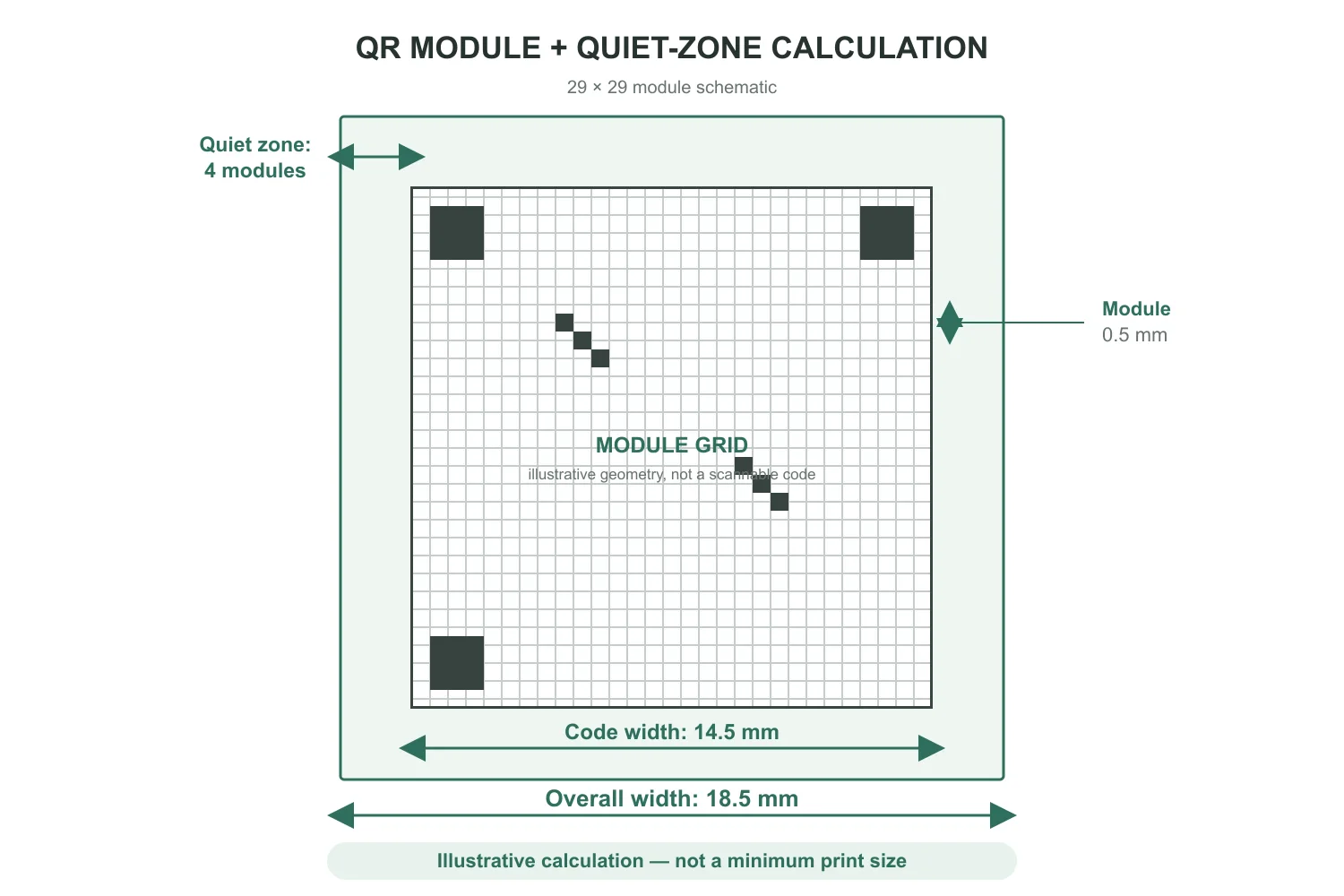
For a standard QR Code, DENSO WAVE specifies a quiet zone at least four modules wide around all four sides. This clear margin separates the symbol from surrounding artwork. Four modules does not mean four millimetres. [2]
Illustrative size calculation: for a 29 × 29 module symbol with 0.5 mm modules, the code itself measures 14.5 mm across. Adding four modules on each side gives (29 + 8) × 0.5 mm = 18.5 mm overall. The quiet zone is 2 mm on each side in this example. These numbers explain the calculation; they are not a minimum-size recommendation for cup printing.
Include this margin in the print layout. Keep slogans, borders and decorative graphics outside it. On transparent packaging, an area with no ink is not necessarily a uniform light background, so the quiet zone also needs review with the cup filled.
QR Code Engineering Quick Reference
Use N for the number of modules across the symbol and X for the module width in millimetres. The 0.4 mm and 0.5 mm values below are calculation examples, not approved minimums for plastic cups.
| Parameter | Rule or calculation | Production decision |
|---|---|---|
| Module width, X | Select for the actual print process and intended readers; no universal cup-specific minimum. | Confirm that printed squares and gaps remain distinct at the proposed size. [1] |
| Quiet zone on each side | At least 4X: 1.6 mm when X = 0.4 mm; 2.0 mm when X = 0.5 mm. | Keep this margin clear and allow additional space for production variation. [2] |
| Width including the minimum quiet zone | (N + 8) × X. For N = 29: 14.8 mm at X = 0.4 mm, or 18.5 mm at X = 0.5 mm. | Recalculate after changing the encoded data or correction level; add any extra production allowance separately. |
| White backing | Where needed, provide a continuous light background beneath the symbol and quiet zone. | Agree the ink construction and test contrast over the intended drinks. An opacity percentage alone is not scan approval. |
| Scanning distance | Specify the expected working range for the cup's use. | Test that range with representative phones, lighting and viewing angles. |
Do Clear Cups Need a White Background?
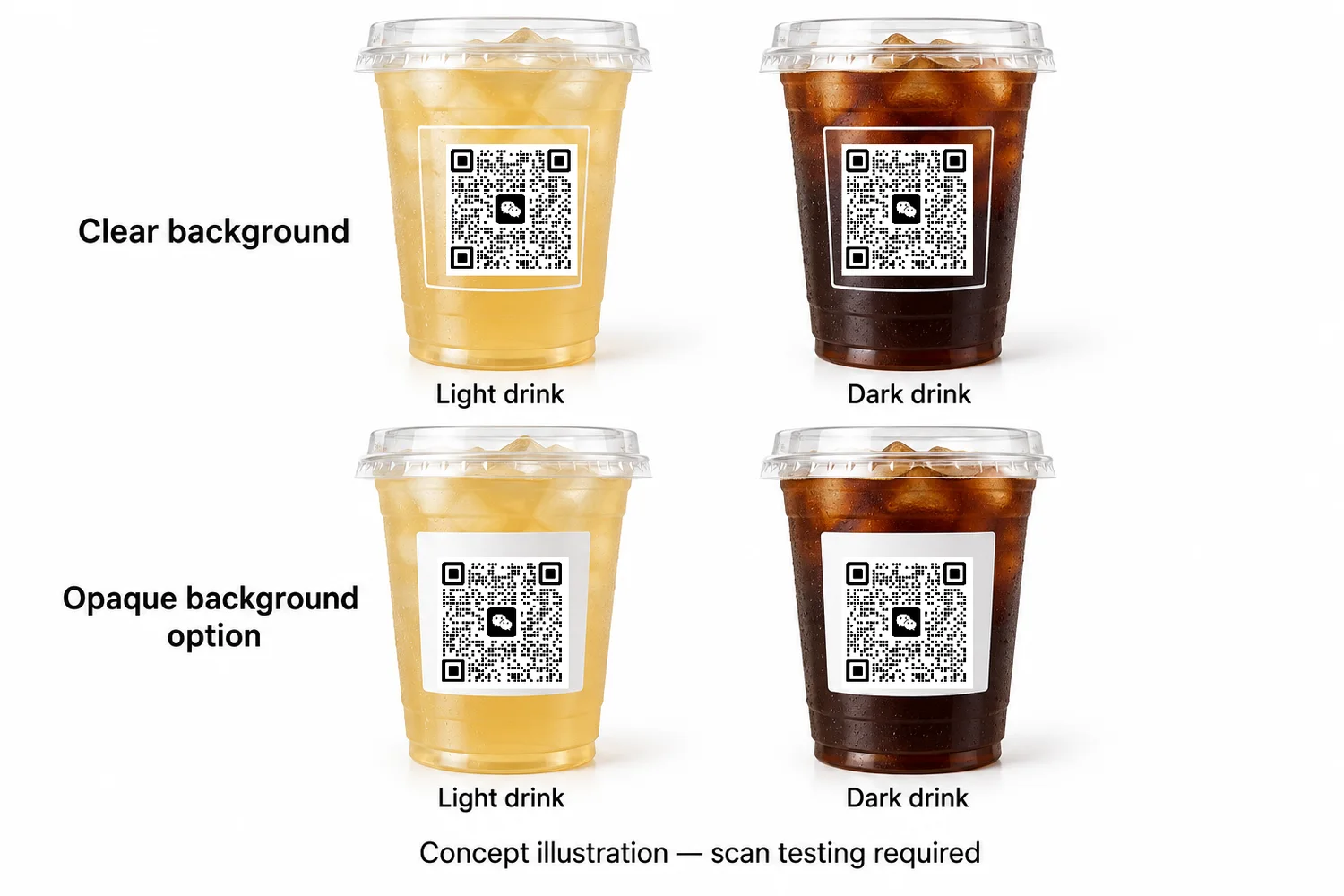
A dark code on a light, stable background is a sensible starting point. Clear plastic alone does not provide that background. Beverage colour, ice and whatever is visible behind an empty cup can change the apparent separation between dark and light areas.
GS1 recommends strong contrast and a quiet zone consistent with the symbol background. Its packaging guidance also identifies translucent substrates, surface reflections and visible contents as possible sources of reading problems. [5] [6]
Review an Opaque Background Where the Process Supports It
Where white ink is available, evaluate a continuous white panel beneath both the code and its quiet zone. Ask the printer to confirm the panel's coverage and its alignment with the dark code. A white shape in a digital proof describes the design; it does not establish the opacity of the printed ink.
Consider a black code over a cup used for both pale lemonade and cold brew. Reviewing only the empty cup against a white sheet leaves the dark-drink condition unanswered. Sample both intended uses. If the drinks will vary across a menu, choose representative backgrounds rather than the one that makes the print look clearest.
White backing is a design option to evaluate, not an automatic requirement for every QR code on a clear cup. Any alternative still needs sufficient contrast in the conditions the buyer expects customers to encounter.
Prepress Registration: Protect the White Panel and Quiet Zone
A continuous white QR panel serves a different purpose from white ink shaped to follow a coloured logo. Esko's prepress documentation distinguishes an inward offset, or choke, from an outward offset, or spread. [9] Pulling back a QR panel that already ends at the minimum quiet-zone boundary would reduce the protected light margin.
Ask the printer for the allowable relative movement between the dark code and white panel on the selected cup and process. Review the separations at that limit in each direction. The panel should still support the complete symbol and its required quiet zone. GS1 recommends allowing more than the minimum quiet zone to accommodate production tolerances. [10]
Artwork clearance check: if the agreed relative shift can reduce white clearance at an edge by T, an initial clearance of at least 4X + T protects a four-module margin against that shift. This is a geometric design check, not a standard press tolerance; other size and print variations need their own allowance.
Have the printer specify any choke or spread and confirm the printed result. Record the agreed registration and trap distances in the job specification. Check the approved construction with dark drinks as well as pale ones.
Where Should a QR Code Sit on a Curved Cup?
Choose an accessible part of the supplier-approved print area where the full code and quiet zone can be viewed together. Check the actual sidewall profile, transitions near the base, normal hand position and any sleeve or sticker used in service.
Increasing module size can help reading, but increasing the complete symbol width can also carry more of it around the cup. GS1's printing guidance identifies excessive curvature as a possible cause of geometric distortion and recommends adapting placement or size to the package. [1] [7]
Resolve that trade-off on the selected cup. Reducing unnecessary encoded information may help retain readable modules within a smaller area. Use the supplier's template and any process-specific compensation; avoid stretching or bending the QR artwork by eye to make it fit.
Place a short instruction such as “Scan for the menu” outside the quiet zone. Coordinate it with the logo and other graphics through the cup branding and placement guide. Check the arrangement while holding a filled sample as a customer would.
How Should Error Correction and Logos Be Handled?
QR codes offer four error-correction levels: L, M, Q and H. Higher correction adds redundancy, which can require more modules or a larger symbol for the same content. At a fixed print width, a denser grid reduces the size of individual modules. Select the setting alongside the artwork and print dimensions. [3]
Keep the initial production design simple: crisp square modules, a plain background and an intact quiet zone. Put the brand logo outside the code. An embedded logo deliberately obscures part of the symbol and consumes some of its ability to recover damaged data; GS1 advises against this treatment for its barcodes. [7]
For a customised marketing design, preserve the original QR file and validate the final decorated version at its actual print size. A correction setting cannot guarantee that lost contrast, an interrupted quiet zone or a distorted pattern will remain readable. Do not treat an advertised correction percentage as permission to cover the same percentage of the visible code.
How to Test QR Codes on Finished, Filled Cups
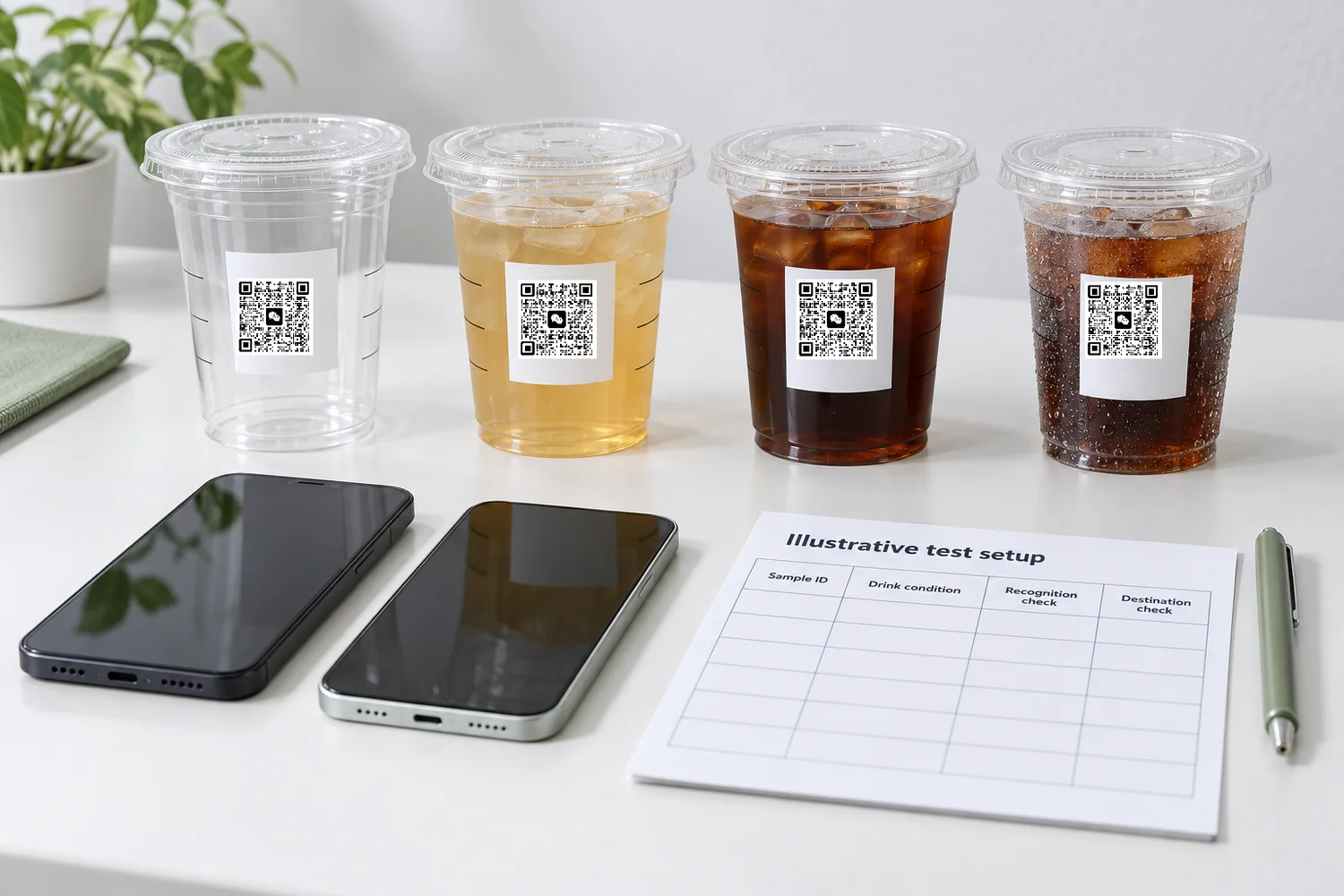
Use a repeatable buyer test plan with agreed acceptance conditions. Record unsuccessful attempts as well as successful ones. The following workflow is a recommendation for sample approval; results must come from the actual cups being evaluated.
- Check the final artwork. Decode the QR content, verify the intended URL and identify the released file revision.
- Inspect the printed sample. Confirm the cup model, code dimensions, position, background and quiet zone against the approved layout.
- Test the intended drinks. Compare empty and filled samples, including representative light and dark backgrounds where relevant.
- Reproduce service conditions. Include normal handling, lighting and condensation expected during use.
- Repeat on representative phones. Use agreed devices and camera applications, distances and viewing angles.
- Record and approve. Log recognition, retries and destination checks, then retain the sample and artwork reference together.
What to Record During the Test
| Test element | What to check | Record to retain |
|---|---|---|
| Sample identity | The intended cup and final print construction. | Cup SKU, sample identifier and artwork revision. |
| Drink and surface | Relevant fills, dry surface and realistic condensation. | Drink, fill condition, observation time and photographs. |
| Viewing conditions | Normal lighting, distance, angle and hand position. | Conditions used and adjustments needed to obtain a reading. |
| Devices | Representative iOS and Android phones using the intended scan interface. | Phone model, operating system and camera or scanning application. |
| Recognition | Repeated attempts under each agreed condition. | Attempts, successful reads, failures and recognition time where measured. |
| Destination | The decoded link, redirects and intended mobile page. | URL, page result, test date and any network-related issue. |
Agree on the devices, distance range, acceptable recognition time and repeat count before testing. This article does not prescribe a universal pass rate or sample quantity. If a required condition produces repeated failures, investigate and revise the design before approval.
A dry sample that reads only when held at one precise angle deserves a closer review if the intended use is an iced takeaway drink. Likewise, separate the time needed to recognise the symbol from the time needed to load a webpage. Slow connectivity can affect the latter even when the printed code is readable.
When Formal Barcode Verification Is Needed
Phone checks describe performance on the devices and conditions tested. They do not produce an ISO print-quality grade. ISO/IEC 15415:2024 defines measurement and grading methods for two-dimensional barcode quality. If a customer or application requires formal verification, agree on the applicable specification and obtain a suitable verification report. [8]
Read the individual results alongside the overall grade, which runs from 0.0 to 4.0. Retain the measurement aperture and illumination wavelength with the report; the test setup matters when interpreting a result. [10] The parameters below help frame a print review; they do not replace the complete verification procedure.
| Verification parameter | What it measures | What to investigate on a cup |
|---|---|---|
| Symbol Contrast (SC) | The reflectance difference between the lightest and darkest symbol areas. | Whether the backing keeps light areas distinct when the cup contains a dark drink. |
| Modulation | How consistently individual modules remain distinguishable as light or dark. | Uneven coverage, local low contrast or other variation across the printed pattern. |
| Axial Non-uniformity (ANU) | Unequal scaling along the symbol's two axes. | Stretched proportions in the artwork or print; this is not a complete measure of cup curvature. |
| Grid Non-uniformity (GNU) | Module-position departures from an ideal, evenly spaced grid. | Local geometric distortion, considered alongside cup position and image capture. |
| Unused Error Correction (UEC) | The error-correction capacity still available after decoding the measured symbol. | Existing print damage consuming recovery capacity. This is not a condensation-tolerance percentage. |
| Print growth | Modules becoming wider or narrower than their intended size. | Dark areas spreading into light gaps, or undersized dark modules. GS1 identifies this as a graded parameter added in the 2024 edition. |
The measurement descriptions draw on GS1's colour and quality guide and Cognex's verifier documentation; the cup-specific checks are practical diagnostic suggestions. [10] [11] Ask the verification provider how the curved cup will be presented and which backing condition will be measured. Continue the separate filled-cup phone tests for actual service conditions.
That report and the destination check address separate risks: barcode verification does not establish whether the user reaches the correct webpage. [6] Use the printed cup sample approval guide to connect the QR review with the wider physical sample and retained-reference process.
Why Does a Printed Cup QR Code Fail to Scan?
Compare a failed sample with the approved file and a known readable sample under the same conditions. Treat the following as diagnostic starting points, not conclusions about a batch without inspection.
| Observed problem | Possible explanation | First check |
|---|---|---|
| The artwork scans, but the printed cup does not. | Small modules, filled gaps, weak edges or altered proportions. | Compare the final-size file and printed pattern under magnification. |
| The empty cup reads; a filled cup struggles. | The drink changes the visible background or contrast. | Review the light areas, quiet zone and proposed opaque background with that drink. |
| Scanning requires repeated tilting. | Glare, curvature or part of the code being hidden from view. | Compare position and lighting while keeping the complete symbol visible. |
| Cold, wet cups behave differently. | Droplets alter the camera view, or handling changes the print. | Compare dry and wet samples and inspect the printed surface. |
| The code is recognised, but the page is wrong or unavailable. | An incorrect URL, redirect, page setting or connection issue. | Read the encoded URL and check the destination independently. |
| A repeat order differs from the retained sample. | A changed file, cup, print construction or production condition. | Compare version records and inspect representative cups from the new run. |
Investigate print defects within the broader plastic cup quality control process. One approved sample establishes a reference; production inspection still needs to address variation across the order.
What Should Buyers Approve Before Bulk Printing?
Keep a compact approval record that the buyer, artwork team and printer can identify without relying on an email description such as “the latest code.”
- Exact cup SKU and applicable production template.
- Encoded URL, intended destination and responsible owner.
- Final QR file and artwork revision, including whether the code is repeated or variable.
- Module count, physical size, quiet zone and agreed position.
- Print method, colours, background construction and registration allowance confirmed for the selected cup.
- Printed-sample reference, test conditions and recorded results.
- Any required formal verification and agreed bulk inspection checks.
Reopen the relevant checks when the encoded content, cup model, artwork scale or print construction changes. Even if the printed code remains unchanged, review its destination before a repeat order or a new campaign. Stored cups can outlast the promotion for which their artwork was created.
Bioleader Cups Technical Summary
Bioleader Cups recommends approving the cup, the code and the destination together. Use the exact cup template, reserve a complete quiet zone and review contrast with the drinks the cup will actually hold. The printed sample should leave a clear record of what was tested and which artwork was approved.
When space is tight, review the encoded content and placement before reducing the module size. When drink backgrounds vary, evaluate the background construction rather than relying on the empty cup. Keep the brand's decorative elements outside the functional code wherever possible.
For a white-backed code, record the panel clearance and agreed registration allowance in the artwork approval. Keep standard requirements, calculated dimensions and sample-test results clearly identified so a repeat order can be checked against the same specification.
For a custom printed cup project, send the selected cup or required format, intended drinks, proposed QR link, artwork and order requirements together. This gives the print review a defined use case and lets the sample approval focus on the conditions that matter to the brand.
A useful approval record can answer four questions months later: which cup was used, which code was printed, how it was checked and who maintains the linked page.
Frequently Asked Questions
What size should a QR code be on a plastic cup?
There is no universal minimum for every plastic cup. Width including a four-module quiet zone on each side is (N + 8) × X, where N is the module count across the code and X is module width. A 29-module symbol at X = 0.5 mm measures 18.5 mm overall. This is a calculation example; approve the size through printed, filled-cup testing.
Does a QR code on a clear cup need a white background?
A white background is useful to evaluate when the drink or surroundings make contrast unpredictable. Where supported, it should provide an appropriate background for both the symbol and its quiet zone. The decision depends on the actual print construction and intended drinks, with the result checked on printed samples.
Can QR codes scan on curved plastic cups?
They can, but performance depends on the cup profile, code dimensions, position and viewing conditions. Keep the entire symbol visible, follow the supplier's production template and avoid stretching the artwork by eye. Test the selected position on the actual cup before approving the order.
Can condensation affect QR code scanning?
Yes. Water droplets can alter the camera's view of the printed pattern. For iced-drink applications, include realistic condensation in the sample test and record the conditions. Dry-cup results alone do not establish performance during cold takeaway service.
Can the destination be changed after the cups are printed?
The encoded data on the cup cannot be changed. If it points to a redirect you control, you can change the destination behind that link. You can also update content at an existing URL you control. Confirm domain ownership, service continuity and the intended page before printing.
References
- DENSO WAVE — Point for Setting the Module Size. Module dimensions, print resolution and scanner capability.
- DENSO WAVE — Point for Determining the Code Area. Four-module quiet zone and overall area calculation.
- DENSO WAVE — Error Correction Feature. Correction levels, redundancy and codeword-based recovery.
- DENSO WAVE — Information Capacity and Versions of QR Code. Data content, symbol versions and module count.
- GS1 — Quiet-Zone and Background Contrast. Contrast between dark modules, light areas and the surrounding margin.
- GS1 — 2D Barcodes at Retail Point-of-Sale Implementation Guideline. Release 1.1.0, December 2025; packaging conditions, verification and destination management. Retail-specific requirements retain their stated application scope.
- GS1 — 2D Barcode Playbook for Creation and Printing. Release 1.0.1, June 2026; placement, curvature and graphic modifications.
- ISO/IEC 15415:2024 — Two-Dimensional Barcode Print Quality. Public scope of the standard covering measurement and grading methods.
- Esko — Adding and Removing White Underprint. Choke and spread directions in white-underprint preparation; no universal cup-press tolerance is specified.
- GS1 — 2D Barcode Colour & Quality Guide. Release 1.0, February 2025; quiet-zone allowance, numerical grades and print-quality parameters, including print growth in ISO/IEC 15415:2024.
- Cognex — ISO/IEC 15415 Parameter Explanations. Technical descriptions of axial and grid non-uniformity and unused error correction; this earlier documentation is used for parameter meaning, not 2024 grading thresholds.