
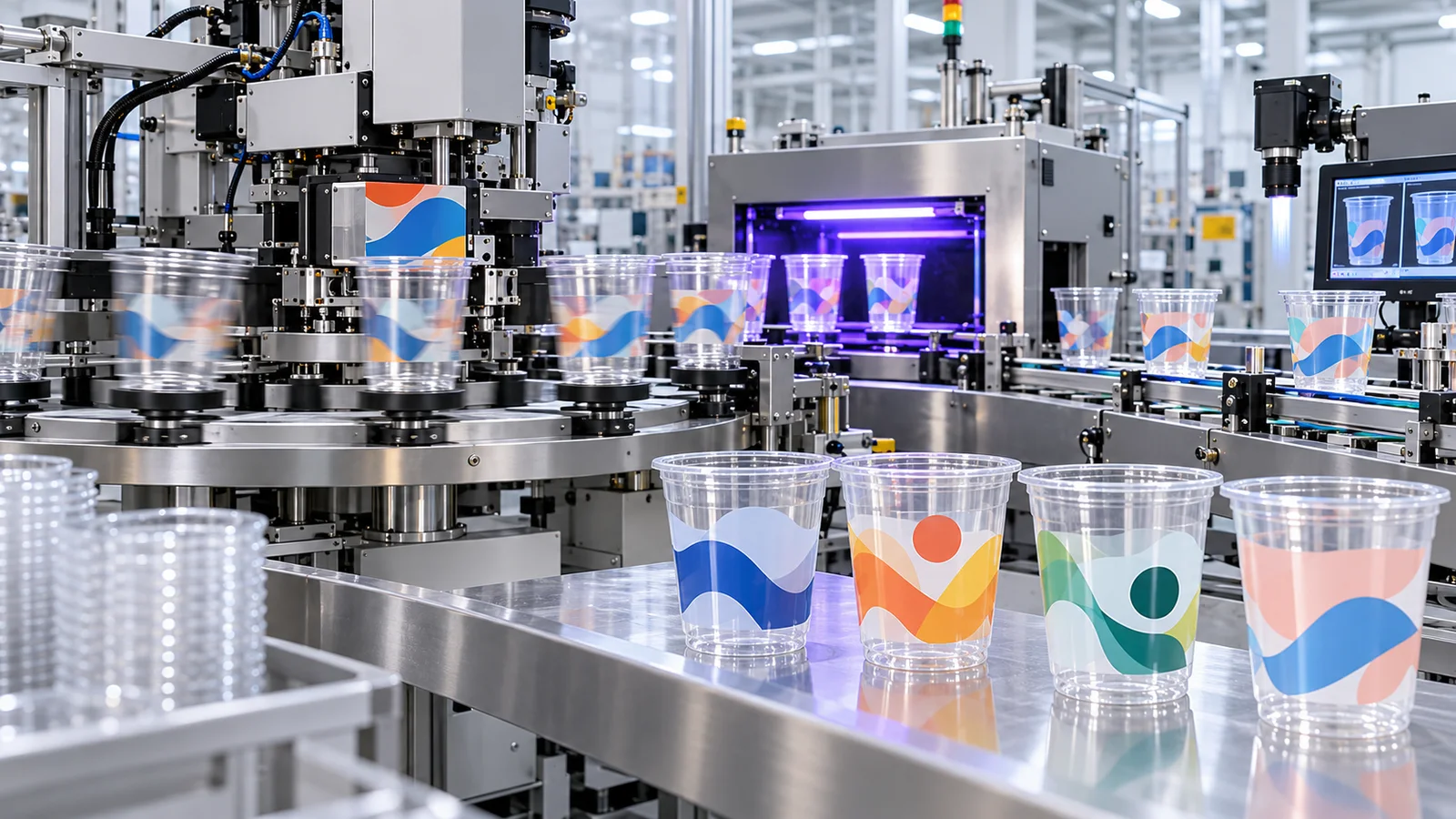
Quick Summary
- To print on plastic cups in industrial production, match the exact plastic substrate and cup geometry to a qualified printing method, prepare cup-specific artwork and surface, use a compatible ink and cure, then inspect the finished physical cup before bulk approval.
How do you print on plastic cups? Identify the exact plastic cup, choose a compatible industrial printing method, prepare the curved surface and artwork, apply a suitable ink, complete its specified cure, and inspect the finished print. Common production routes include dry offset, screen printing and direct-to-object digital printing; pad printing can suit some localized or geometry-specific applications. The method must match the substrate, cup geometry, artwork and production volume.
Industrial plastic cup printing is different from printing on flat paper: the cup must be held and often rotated, while ink has to wet a non-porous plastic surface. Surface preparation, ink compatibility and curing are part of the printing system, not optional afterthoughts. This guide covers industrial printing for foodservice plastic cups. Hobby vinyl, stickers and hand-applied decoration are different processes and are not equivalent to factory-printed cups.
This article explains the manufacturing side of plastic cup printing. For file formats, colors, print-area approval and artwork preparation, see the custom cup printing guide. For the wider order workflow, including lids and commercial approval, see the B2B guide to custom printed plastic cups.
Core printing rule: lock the cup before locking the printing route. The production cup determines sidewall geometry, printable area, handling method and the surface to which ink must bond.
How to Print on Plastic Cups
- Identify the plastic material and exact cup geometry.
- Select a printing method compatible with the cup and artwork.
- Prepare artwork for the curved or tapered print area.
- Clean and treat the plastic surface where required.
- Print with a compatible ink and complete the specified curing process.
- Inspect adhesion, registration, color and the finished physical cup.
Why Is Printing on a Plastic Cup Different From Printing on a Flat Surface?
Plastic cup printing is a three-dimensional manufacturing process: the container has to be held, rotated or indexed while the printing system maintains controlled image transfer across a curved, often tapered, non-porous surface.
The Printing Surface Is Curved
On a flat substrate, the print plane remains fixed. On a cup, the wall continually changes its position relative to the blanket, screen or printhead as the container rotates. The equipment therefore has to control the cup as carefully as it controls the ink.
This is easy to overlook when the artwork is a small logo. It becomes much more obvious with long horizontal lines, borders, large solid areas and graphics that wrap around a significant portion of the cup. Small errors in cup position or artwork geometry can become visible over a large printed area.
A Tapered Cup Is Not a Cylinder
Many cold-drink cups are wider near the rim and narrower near the base. Their circumference changes along the sidewall. A flat rectangular design therefore cannot simply be wrapped around the cup as though the container were a perfect cylinder.
This is why nominal capacity is not enough to define a printing template. Two cups sold as the same ounce size can have different heights, upper diameters, lower diameters and taper angles. If the physical cup changes, the production artwork may also need to change.
Plastic Cup Surfaces Do Not Absorb Ink Like Paper
Paper accepts ink partly through absorption. Plastic does not behave that way. On a plastic cup, the ink must wet the surface, remain where it is placed and develop sufficient adhesion after curing. Surface chemistry therefore becomes a manufacturing variable rather than a purely graphic one.
Depending on the substrate, ink and equipment, a production line may use corona, flame, plasma, primer or another surface-preparation route before printing. Surface-energy measurements can be useful process-control data, but there is no single dyne value that should be copied across every PET or PLA cup project. The required level must be validated against the actual material, ink system and printing process.
The same caution applies to curing. PLA is generally more heat-sensitive than PET in cold-cup applications, but that does not mean every PLA cup must use LED-UV or that every PET cup can tolerate the same curing energy. Resin grade, wall thickness, exposure time, lamp geometry and cooling all affect the real process window.
The PET cup range and PLA cup range show available base containers. Buyers must confirm the exact cup before assuming its printing capability.
Surface Treatment Is Not a Marketing Feature
A statement such as “corona treated” is useful only when it is tied to a qualified ink-and-substrate system. The production objective is not to reach an impressive dyne number; it is to create repeatable wetting, curing and adhesion on the selected cup.
Bioleader Cups: Cup Production & Custom Printing
Bioleader Cups coordinates cup forming, custom logo printing, finished-cup checks and export packing around the approved product specification. This factory video, also featured on our custom printed cups page, gives a brief overview. Confirm the exact cup, artwork and printing arrangement before production.
Which Printing Methods Are Used on Plastic Cups?
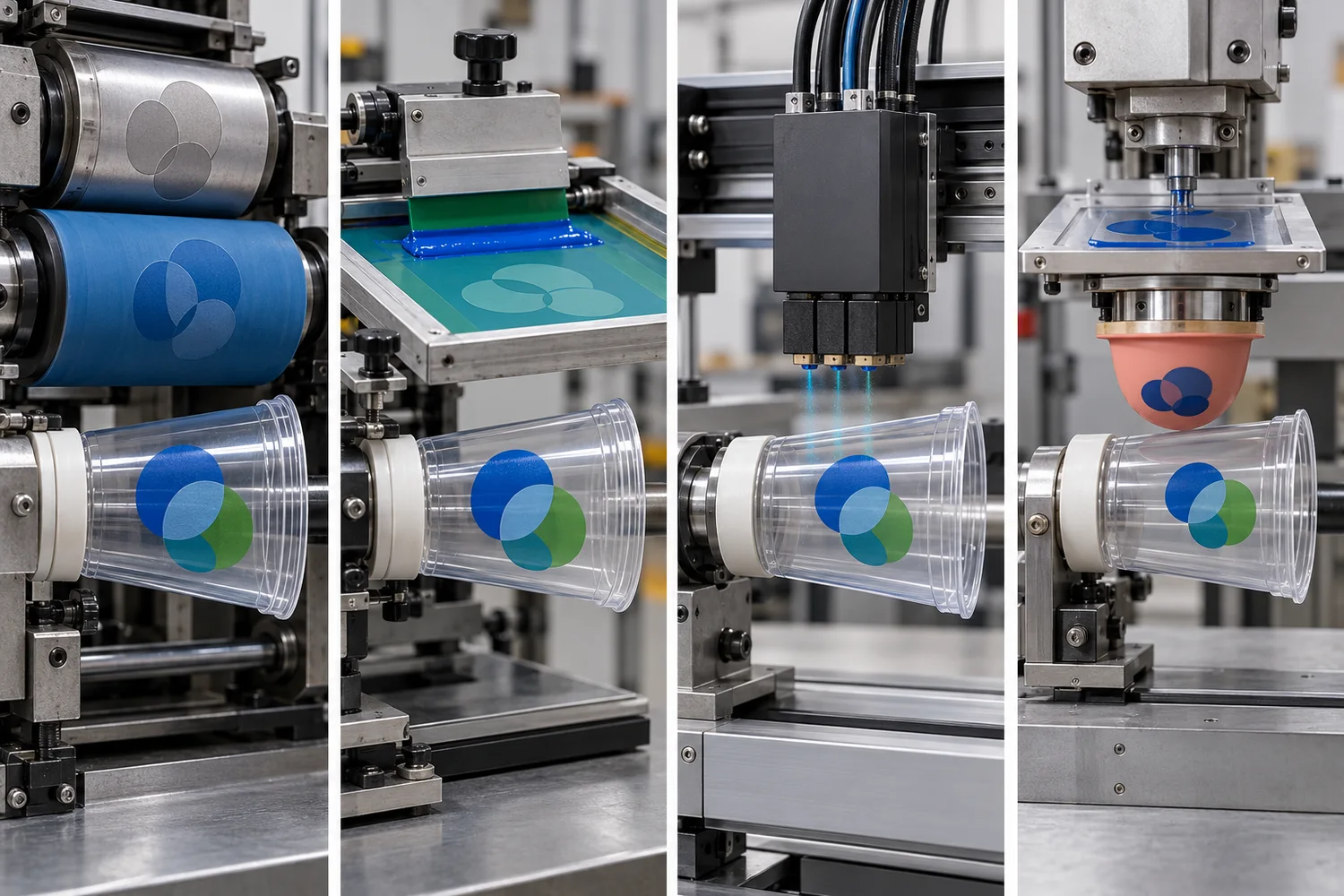
Dry offset, screen and direct-to-object digital printing are distinct industrial routes for decorating suitable cups; pad printing may fit a smaller localized design or a geometry-specific job. None is universally best. Cup shape, artwork, substrate, ink system, throughput and available equipment must be checked together.
Dry Offset Printing
Dry offset is an indirect cup-decoration process in which an inked plate transfers the image to a blanket, and the blanket transfers the combined image to the rotating cup. Industrial dry-offset cup presses are designed for high-throughput decoration of round or tapered containers, but color capacity and rated speed depend on the specific machine configuration.[5]
1. Printing Plates Carry the Image
The job is separated into the image components required by the press. Each printing unit carries the plate for its assigned color or image element. This physical tooling is one reason a dry-offset job has to be prepared around the final production artwork rather than a rough visual mockup.
Artwork complexity affects more than appearance. Fine reverses, very thin rules, large solids and multiple aligned colors all change what the press has to reproduce. A design that prints reliably as a compact two-color mark may behave very differently when converted into a wide band or multi-color wrap.
2. The Plate Transfers Ink to a Blanket
The inked image does not normally go straight from the plate to the cup. It is first transferred to a flexible blanket. That intermediate transfer surface is the defining feature of offset decoration.
Dry offset image path: plate → blanket → cup
3. The Blanket Transfers the Image to the Cup
The cup is held on a mandrel or equivalent support and rotated through the printing zone. The blanket contacts the outer wall and transfers the image while cup position, rotation and print timing are controlled by the machine.
This is where cup consistency becomes part of print consistency. If a production cup differs in shape from the cup used to prepare the artwork and press setup, the finished image can shift or distort even though the digital file has not changed.
4. The Printed Ink Is Cured
After image transfer, the ink has to reach the required cured state. Many industrial cup-decoration systems combine pre-treatment and UV curing with the printing line, but the exact treatment and cure method are equipment- and ink-specific.
A buyer should therefore avoid asking only whether the supplier uses “UV ink.” A more useful question is whether the complete cup, surface treatment, ink and curing combination has been validated for the intended production result. Dry offset can be attractive for repeat, higher-volume cup decoration when the actual press, cup geometry and artwork are matched; confirm the finished registration and appearance rather than assuming a press type guarantees them.
Bioleader Cups Production View
Dry offset should be evaluated as a production system, not as a quality label. High press speed is valuable only when image transfer, registration, ink density and curing remain within the agreed standard on the actual cup. The approved physical result matters more than the headline speed of the machine.
Screen Printing
Screen printing deposits ink directly through open areas of a stencil-based mesh onto the cup surface while the container rotates or indexes through the print station. It is a direct process: there is no offset blanket between the screen and the cup.
| Process | Image Path | Physical Tooling | Main Production Control |
|---|---|---|---|
| Dry offset | Plate → blanket → cup | Printing plates and blanket | Transfer, registration, cup rotation and cure |
| Screen printing | Screen → cup | Stencil-based screen | Ink deposit, screen registration, cup rotation and cure |
Screen printing is often associated with direct spot-color graphics and relatively bold artwork because the process can place a substantial ink layer onto the product. It can be less suitable for details below the selected screen-and-ink system's reliable reproduction limit. Ink-film thickness is not a universal number that should be copied into a buyer specification. Mesh, emulsion, squeegee, ink rheology, print speed and substrate all affect the deposited film.
The same applies to production speed and color count. Automatic cup screen-printing lines exist, but their output depends heavily on the number of stations, cup handling, treatment, curing and registration requirements. A generic statement that “screen printing runs at X cups per minute” is less useful than a supplier-specific capability confirmed for the actual job.
Do Not Compare Processes With False-Equivalent Numbers
Screen ruling, inkjet DPI and plate resolution describe different parts of different printing systems. They are not interchangeable measures of “print quality.” A 1200 dpi digital specification cannot be ranked directly against an offset LPI value without considering dot formation, ink, substrate, viewing distance and the actual graphic.
Direct-to-Object Digital Printing
Direct-to-object digital printing uses digitally controlled inkjet printheads to deposit ink directly onto a cylindrical or tapered object without a conventional printing plate or screen. The process can reproduce full-color graphics and makes artwork changeover more flexible, but equipment compatibility still controls what can actually be printed.[6]
Digital image path: digital file → printhead → cup surface → cure
Digital printing is often described as “plate-free,” which is accurate at the image-generation stage, but that does not mean setup disappears. The object still needs compatible tooling or fixtures. The machine has to know the cup diameter and taper, maintain the correct printhead relationship to the surface, control rotation, manage white ink where required and cure the deposited ink.
Published cylindrical inkjet systems can reach very high image resolutions, but DPI is only one part of finished quality. Drop size, pass mode, ink configuration, white layer strategy, cup motion, surface pretreatment and curing all affect the visible result.
Digital printing is also not automatically the economical choice for every low-volume disposable-cup order. Commercial feasibility depends on equipment availability, loading automation, print time, ink coverage, fixture changeover and the supplier’s actual production model. “No plate” does not mean “no setup cost” or “any MOQ.”
For full-color or variable artwork, ask for a sample on the exact cup. Check printhead clearance around the taper, white backing where needed, registration, cure and the resulting appearance when the cup is filled. For a detailed color decision rather than a process overview, see the spot-color versus CMYK cup-printing guide.
Can You Pad Print on Plastic Cups?
Pad printing may suit certain plastic cups or drinkware when the image is relatively localized or the surface geometry is difficult for another contact method. Ink fills an etched plate; a compliant silicone pad picks up the image and transfers it to the three-dimensional cup surface. This does not make pad printing the standard route for every disposable cup.[1]
Before specifying it, confirm cup geometry, printable area, artwork size, substrate, compatible ink, cure, desired throughput and the supplier's actual equipment. A small logo that a pad can reach is a different production question from a wide wraparound print. The buyer should approve the finished cup rather than infer suitability from the process name alone.
Dry Offset vs. Screen vs. Digital vs. Pad: What Buyers Should Compare
The useful comparison is not which technology has the biggest number; it is how each process handles the selected cup, artwork and production requirement.
| Decision Factor | Dry Offset | Screen Printing | Direct-to-Object Digital | Pad Printing |
|---|---|---|---|---|
| Image transfer | Plate to blanket to cup | Screen directly to cup | Printhead directly to cup | Etched plate to silicone pad to cup |
| Physical image tooling | Printing plates | Stencil-based screens | No conventional image plate or screen | Etched plate and silicone pad |
| Typical production profile | Well suited to high-throughput industrial cup decoration when the press and job are matched | Useful for suitable spot-color and container-decoration programs; output is line-specific | Flexible artwork changes and full-color capability; output is highly machine- and image-dependent | May suit a localized image or geometry-sensitive area; throughput is job- and equipment-dependent |
| Color / image capability | Press configuration and artwork determine available spot-color capability | Number of print stations and registration control determine practical color count | Ink configuration can support process colors, white and optional effects depending on equipment | Plate, pad, ink and equipment determine the practical image and color setup |
| Resolution metric | Plate, screen and prepress parameters are process-specific | Mesh and stencil parameters are process-specific | DPI and pass mode are machine-specific | Etching, pad and ink-transfer parameters are job-specific |
| Ink-film thickness | Depends on ink, press and transfer conditions | Depends on mesh, stencil, squeegee and ink | Depends on drop size, pass count, white layers and ink configuration | Depends on plate, pad, ink and transfer setup |
| MOQ | MOQ is a supplier and order-economics decision, not a universal technical property of the printing method. | |||
| Buyer approval focus | Geometry, registration, ink density and finished appearance | Ink deposit, registration, adhesion and finished appearance | Object handling, image quality, white strategy, adhesion and cure | Accessible print area, transfer, adhesion and physical sample |
| Typical decision question | Does the job need a qualified high-throughput cup-decoration route? | Does the artwork suit direct spot-color decoration? | Is full-color or variable-artwork flexibility important? | Is the image localized or the surface geometry difficult? |
This is deliberately different from a table that assigns one universal LPI, ink thickness, press speed or MOQ to each process. Such numbers can be useful only when they come from the actual machine, ink and supplier specification. They become misleading when presented as industry-wide constants.
How Does the Plastic Material Affect Printing?
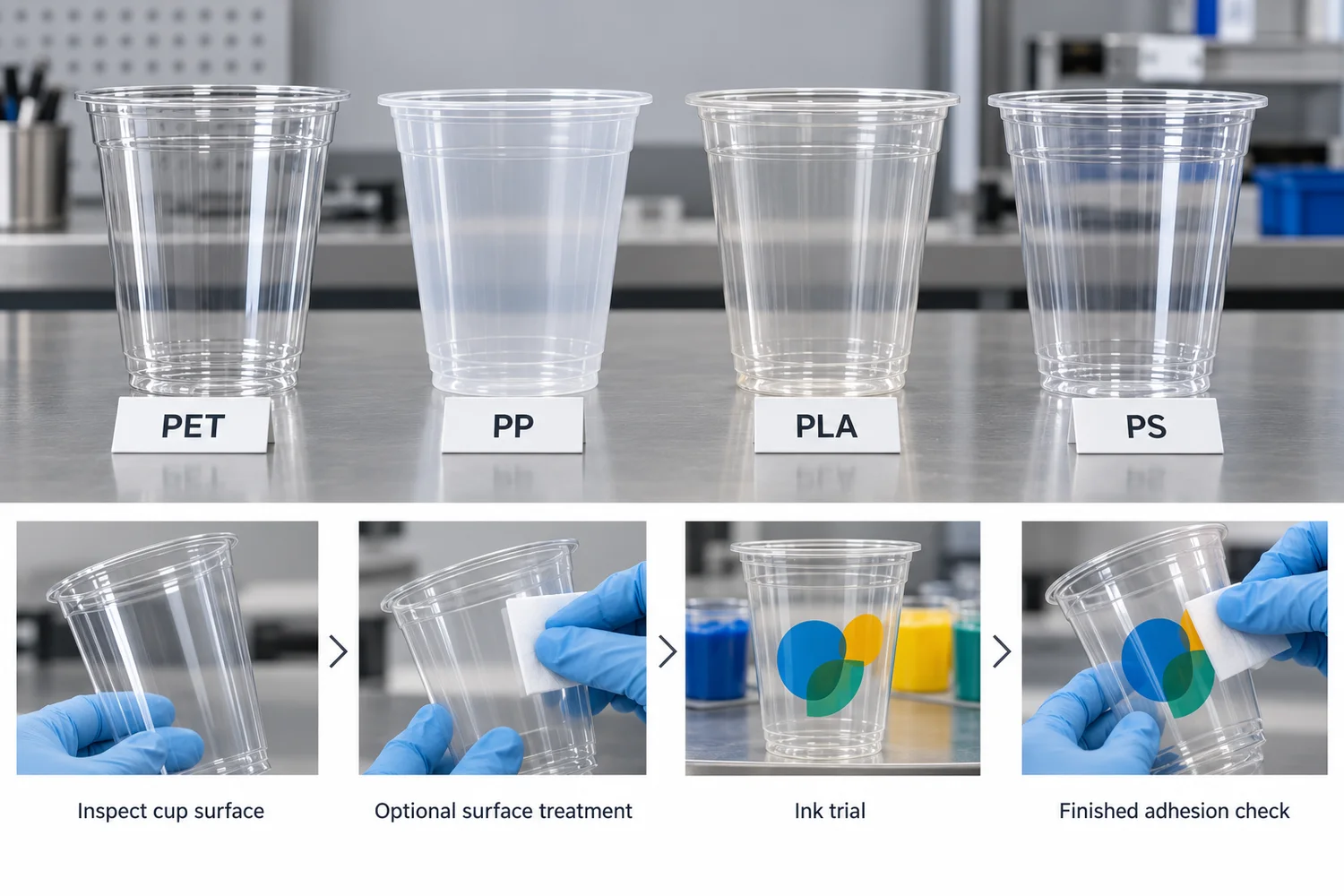
Polymer family affects printability, but the finished cup, surface condition, ink system and curing process must be qualified together. The table identifies questions to investigate, not a universal rule assigning one printing method to each plastic.
| Material | Main printing issue to verify |
|---|---|
| PET | Ink wetting, actual surface condition, treatment and curing compatibility for the selected cup. |
| PP | Its relatively low surface energy makes surface preparation and the chosen ink system especially important.[2] |
| PLA | Heat sensitivity and curing conditions require qualification on the exact clear-cup product. |
| PS | Confirm the exact cup format, substrate surface and ink compatibility before approving the route. |
Do not copy one dyne threshold, curing temperature or preferred technology across PET, PP, PLA and PS. Their finished surfaces can also differ with formulation, forming, storage, handling and contamination. Ask the printer what was qualified on the actual cup, not merely on the resin family.
Why Do Plastic Cups Need Surface Treatment Before Printing?
Many plastic surfaces present relatively low surface energy to a particular ink. Ink may physically reach the cup but still fail to spread evenly or anchor after curing. Surface contamination, additives or handling residue can make that problem worse. Cleaning and treatment should therefore be evaluated together with the actual substrate and ink, not treated as a generic checkbox.[3]
Depending on the cup and production route, corona, flame or plasma treatment may improve wetting and adhesion by modifying the outer surface. The appropriate treatment and target condition must be qualified for the exact cup, ink and process; excessive or inappropriate treatment is not automatically better. No single dyne value should be copied across every PET or PLA cup project.[3]
How Is Artwork Prepared for a Curved or Tapered Cup?
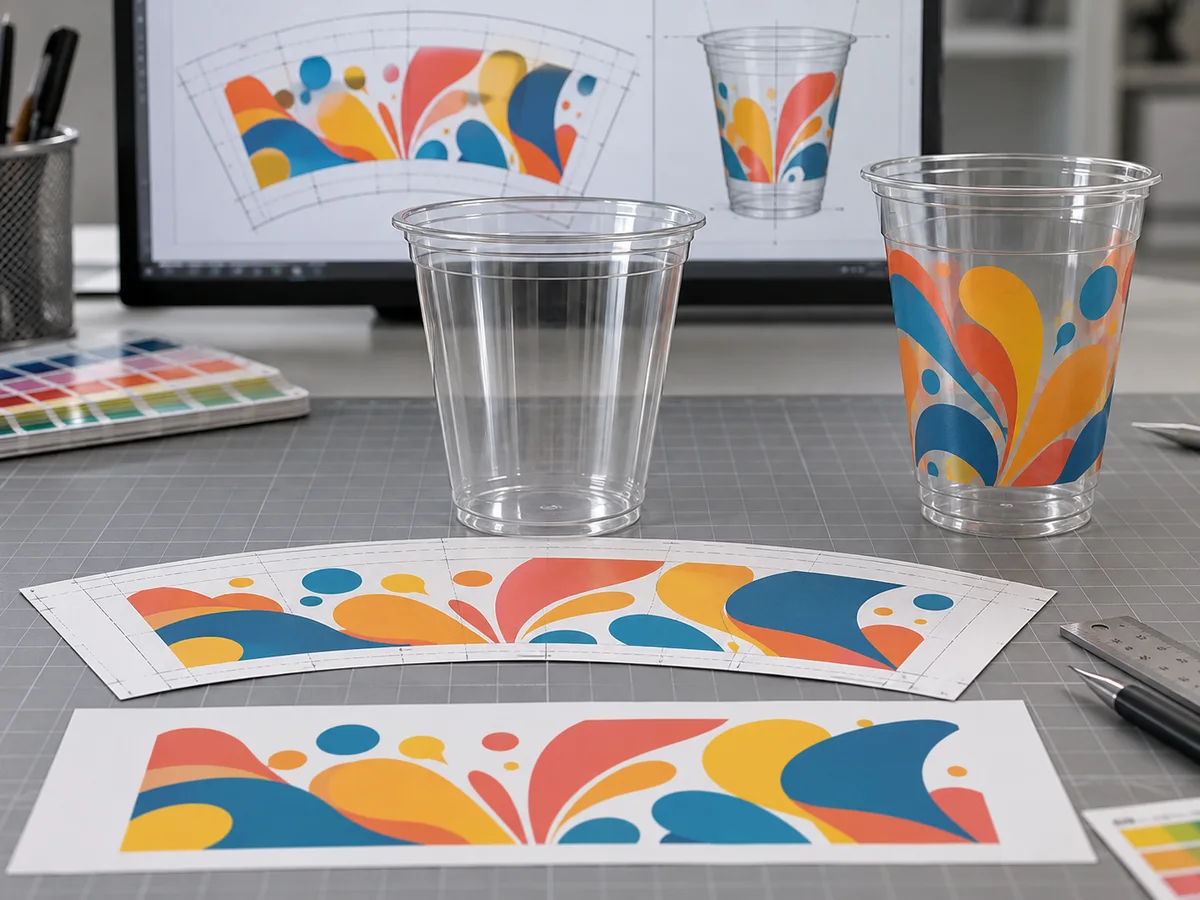
Production artwork for a tapered cup is normally built on a cup-specific print template so the flat graphic compensates for the changing circumference of the sidewall. The file can look curved or distorted on screen because it is being prepared to look correct after it is mapped onto the three-dimensional cup.
Why Straight Artwork Can Look Wrong on the Cup
Imagine a long horizontal band drawn as a perfect rectangle in a flat file. If that rectangle is transferred onto a conical surface without compensation, the different circumference at the top and bottom changes how the band is perceived. Circles, boxes and vertical elements can also appear widened, compressed or otherwise distorted by the cup profile.
Prepress Uses Cup-Specific Vector Compensation
A professional template effectively pre-distorts the production artwork. Designers may see a curved or fan-shaped layout rather than a normal rectangle. That is not a design error. It is the geometric compensation required to map the graphic onto the selected cup.
“Arc distortion” is a useful way to describe the concept, but the correction should not be treated as one universal mathematical formula based only on a taper angle. Real templates also depend on printable height, circumference, machine geometry, no-print gaps and the supplier’s production method.
Do Not Reuse One Template Across Different Cup Sizes
Scaling one artwork file from a small cup to a larger cup is not the same as preparing a new production layout. The two cups may have different taper, height and available print area. Each production cup should be checked against its own approved template.
How Do Ink and Curing Affect Plastic Cup Printing?
A successful print is a system: substrate + surface condition + ink + printing process + cure. Ink compatibility, surface preparation and curing are separate checks. A good ink on a contaminated or poorly prepared cup can still fail; a well-treated cup with an incompatible or under-cured ink can fail too.[3]
Ink Must Match the Substrate and Printing Route
The supplier should qualify the ink for the selected PET, PP, PLA or PS cup and the actual offset, screen, digital or pad-printing process. Ask whether the ink system, any primer and the production surface treatment have been evaluated together. Do not infer finished-cup adhesion from the ink series name alone.
Curing Is a Process Window, Not an On-Off Step
Where UV or LED-UV inks are used, the equipment must deliver the cure required by that ink and printed layer. Under-curing can leave insufficient final performance; excessive heat or an inappropriate cure can affect heat-sensitive cups, including some clear PLA formats. Other ink systems may follow different drying or curing mechanisms. The supplier must confirm the process window without borrowing a universal temperature, lamp power or line speed from another cup project.
This is especially relevant when moving a design from one material or cup family to another. A curing setup validated for one cup should not automatically be assumed to work identically on another.
How Ink Adhesion Should Be Checked
Factories may use tape, cross-hatch, rub, scratch or other agreed tests to evaluate print durability. The important point is to define the method before it becomes an acceptance dispute. The test should specify the sample condition, tool or tape, number of repetitions, dwell time where relevant, inspection method and pass/fail criterion.
A named ASTM or ISO method should not be inserted into a purchase specification simply because it sounds authoritative. The method has to be appropriate to the substrate and coating system, and both buyer and supplier should understand how it will be applied to the printed cup.
Food-Contact Printing: What B2B Buyers Should Verify
Printing on a foodservice cup should be assessed as part of the finished food-contact article, not by relying on a generic claim that the ink is “food grade.” The printed surface, substrate, ink formulation, curing condition, possible migration pathways and destination-market requirements all matter.
For most branded cold cups, decoration is intended for the outer, non-food-contact surface. That does not make ink selection irrelevant. Substances can potentially transfer through a substrate or by set-off under some packaging conditions, so ink formulation and good manufacturing practice remain part of the compliance assessment.[4]
Buyers should ask the supplier to identify the ink system used for the actual order and provide the appropriate compliance basis for the destination market where required. Avoid accepting statements such as “FDA ink” or “EU 10/2011 ink” without understanding what substance, intended use and finished article the evidence actually covers.
Food-contact documentation for the plastic cup itself is a separate verification task. The food-contact compliance guide for plastic cups explains how buyers should review product and market documentation before treating a supplier statement as approval.
Do Not Confuse Ink Marketing With Finished-Article Compliance
A compliant ingredient, ink series or supplier declaration does not automatically prove that every printed cup configuration is compliant in every market. The buyer should verify the intended application, printed side, curing process and finished-article documentation required for the destination market.
Why Does Printing Peel, Rub Off or Shift on Plastic Cups?
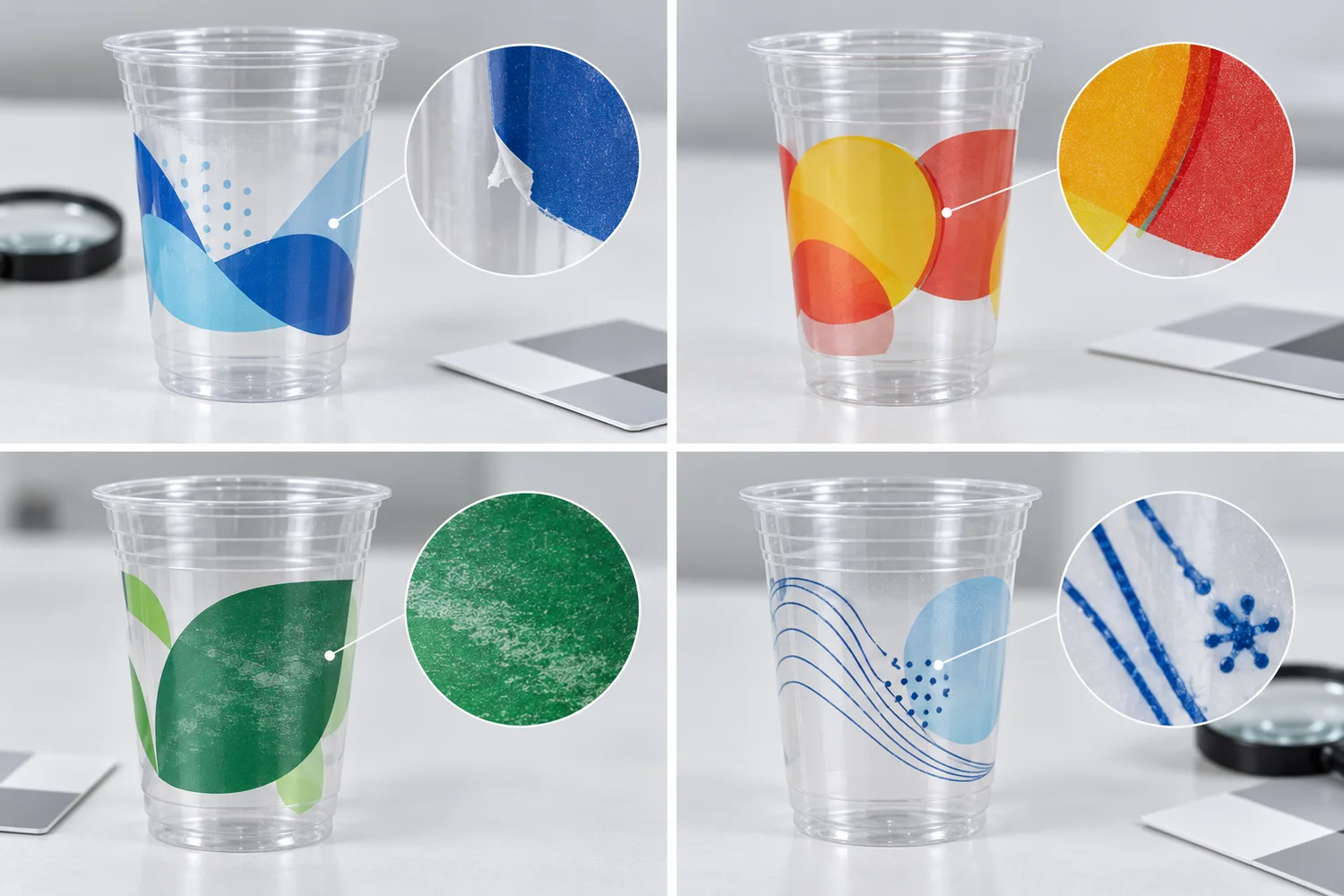
Use a visible defect to choose what to investigate; do not treat the symptom alone as a confirmed root cause. Review a retained physical sample and the actual cup, artwork revision, ink and line settings before changing production.
| Symptom | Possible area to investigate |
|---|---|
| Ink peels from the cup | Surface condition, treatment, ink compatibility or cure |
| Ink rubs during handling | Cure, ink system or abrasion resistance |
| Print shifts around the cup | Registration, cup positioning or artwork setup |
| Small text fills in | Artwork, plate or screen, and process resolution |
| Colors change when the cup is filled | Transparent substrate, beverage background and white backing |
| Print varies between batches | Substrate, treatment, ink, cure or setup variation |
A stretched logo may also indicate a cup-specific artwork or taper mismatch. Large solids can reveal uneven ink transfer or coverage. Agree on an inspection and test method before deciding which variable caused the failure; a digital proof alone cannot settle a physical adhesion dispute.
Printing is only one part of finished-order inspection. The plastic cup quality-control guide covers the wider pre-shipment review of dimensions, appearance, lid fit, printing, packing and order identity.
How Are Plastic Cups Printed in Production?
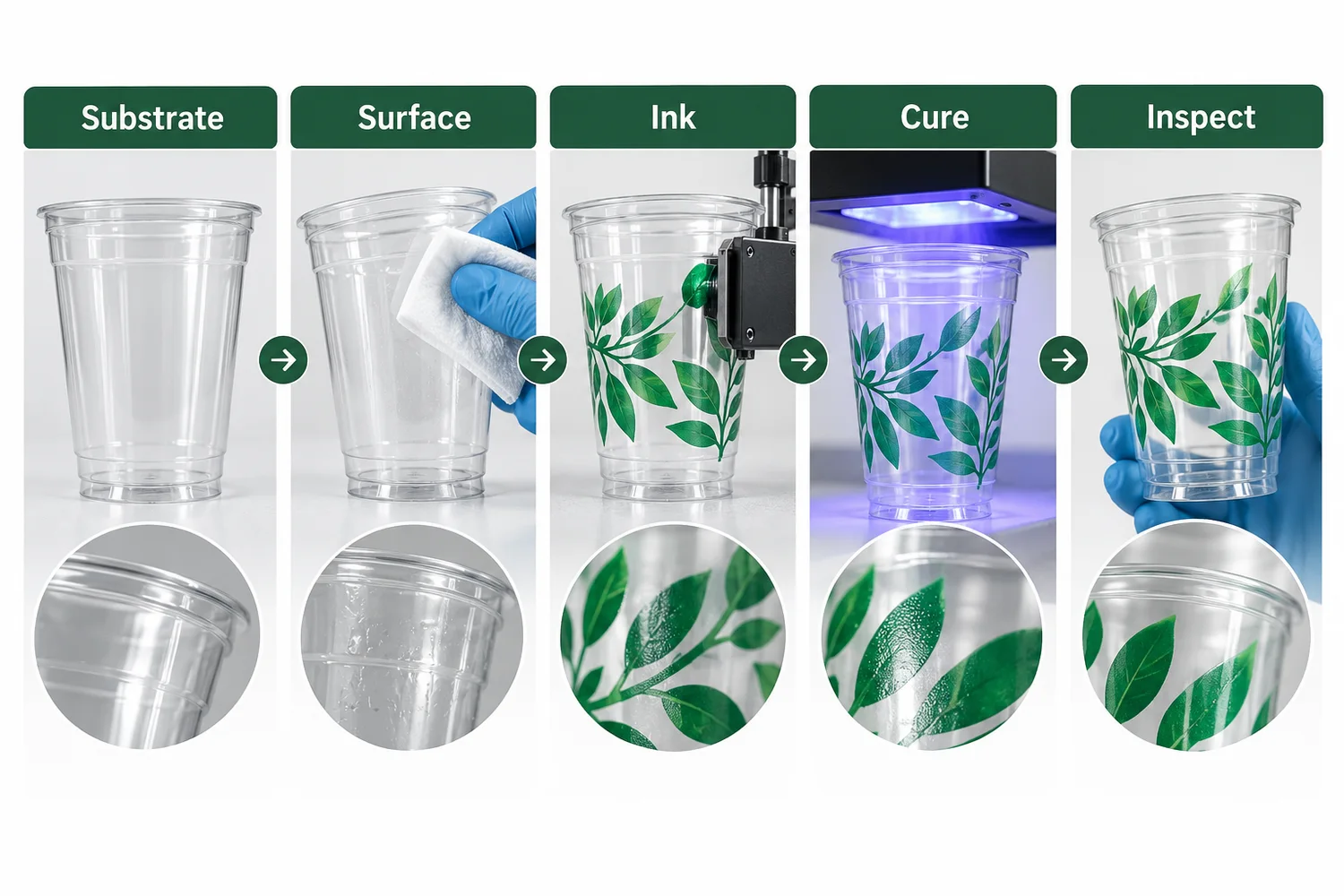
Although equipment differs, a controlled custom-printing project normally follows the same logic: define the cup, qualify the print route, prepare production tooling, treat and print the surface, cure the ink, then approve the physical result.
- Lock the exact cup. Confirm the production cup and its geometry before final print preparation.
- Confirm the printing route. Match the cup, artwork structure and production requirement to a qualified process.
- Prepare the cup-specific artwork. Use the approved production template rather than a generic flat layout.
- Prepare tooling and machine setup. Plates, screens, digital job files, mandrels, fixtures and registration settings depend on the selected process.
- Treat the surface where required. Apply the validated pretreatment for the substrate and ink system.
- Print and cure. Control cup movement, image transfer or jetting, ink delivery and curing as one continuous production process.
- Inspect the physical print. Review position, distortion, registration, ink appearance, adhesion and other agreed criteria.
- Retain the approval reference. Tie the accepted sample and artwork revision to the production order so repeat orders do not rely on memory.
A digital proof can verify content and general layout, but it cannot fully reproduce the behavior of ink on the real cup. When physical approval is required, the plastic cup sample approval guide explains how printed samples and golden samples serve different control purposes.
How Should Buyers Approve a Printed Plastic Cup?
Approve the print on the exact production cup, not only on a flat PDF. Compare the physical sample with the approved artwork and inspect print position, edge definition, registration, color appearance on an empty and filled cup, adhesion and the agreed handling condition. Record the cup SKU, print route, artwork revision and accepted sample so repeat production uses the same reference.
For artwork files, colors, print area and sample sign-off, use the custom cup printing and artwork approval guide. For logo size, position and drink visibility, see the cup branding and placement guide. If a design includes a scannable code, use the separate QR code sizing and scan-testing guide rather than treating this process overview as a code-verification procedure.
Buyer Checklist
Before releasing a custom printed cup order, confirm the manufacturing variables that can change the physical result.
- Exact cup: the approved cup family, material and physical geometry are fixed.
- Print process: the supplier has identified the actual printing route for the order.
- Cup-specific template: production artwork is built for the selected cup rather than scaled from another size.
- Artwork revision: the order references one controlled final version.
- Print coverage: large solids, wraparound graphics, fine text and reverse elements have been reviewed for process limits.
- Surface preparation: any required treatment is part of the validated ink-and-substrate process.
- Curing: the curing method and line settings are appropriate for the selected cup and ink system.
- Adhesion test: any required tape, rub or durability test has an agreed procedure and pass/fail criterion.
- Food-contact review: the ink application and finished printed article have the documentation required for the destination market where applicable.
- Physical approval: the buyer knows whether a digital proof, printed sample or retained golden sample controls bulk production.
Bioleader Cups Authority Summary
For B2B custom cup programs, Bioleader Cups recommends treating print quality as a controlled manufacturing chain rather than a design-service add-on. The strongest sequence is exact cup → cup-specific artwork → qualified print process → validated treatment and cure → physical approval → controlled repeat-order reference. Each step removes a different source of variation, which is why a visually attractive PDF alone is not enough to approve bulk printing.
Final Recommendation
Do not choose dry offset, screen, digital or pad printing from a generic comparison chart alone. The methods use different image-transfer systems, and their real performance depends on the cup, artwork, ink, surface preparation, curing system and production equipment. The method alone does not determine print quality.
Equally, do not over-specify a project with borrowed engineering numbers. A universal LPI, ink-film thickness, dyne level, press speed or MOQ can create a false sense of precision when the value was taken from a different machine or substrate. Ask the supplier for the parameters that control your actual cup and print route.
The practical buyer sequence is straightforward: select the cup, prepare cup-specific artwork, confirm the qualified printing process, define the approval criteria, and judge the physical printed cup before bulk release. When the cup family and branding requirement are already known, buyers can review the commercial customization path on the Cupschina Custom Cups page.
Frequently Asked Questions
What is the best way to print on plastic cups?
There is no universally best method. Dry offset, screen, direct-to-object digital or, for some localized applications, pad printing may be suitable. The supplier should qualify the route against the exact cup geometry, substrate, artwork, production volume, ink system and finished physical result.
Can you screen print on plastic cups?
Yes, when the cup can be held and presented to a compatible screen-printing system. This route may suit direct spot-color artwork, but practical detail, print area, registration, ink and output depend on the exact cup and equipment.
Can you digitally print on plastic cups?
Yes, if a direct-to-object printer, fixtures, ink and curing route are qualified for the cup's material and geometry. Digital can accommodate variable artwork, subject to equipment suitability and order economics for the proposed cup.
Why does ink not stick well to some plastic cups?
Possible causes include an unsuitable or contaminated surface, insufficient or mismatched treatment, incompatible ink or incomplete cure. The symptom does not prove one cause; the supplier should test the actual cup and printing system before changing the process.
Does PET, PP or PLA require a different printing process?
Not automatically. Each polymer family can present different surface and thermal constraints, but no one-to-one material-to-method rule is reliable. Confirm the finished cup, treatment, ink, geometry, curing and physical sample for the proposed route.
References
- Inkcups — Pad Printing 101. Equipment-maker explanation of etched plate → silicone pad → three-dimensional product image transfer; not evidence that every disposable cup can be pad-printed.
- Marabu — UltraPack UV Ink Technical Data Sheet. Ink-manufacturer guidance on substrate-dependent printability and the need to pretreat low-surface-energy PP; a specific ink data sheet, not a universal cup specification.
- Enercon — Improve Ink Printing Adhesion with Surface Treating. Surface-treatment manufacturer's discussion of ink chemistry, substrate quality, treatment and transfer method as interacting adhesion variables.
- EuPIA — Guideline on Printing Inks Applied to Food Contact Materials. Industry guidance on ink use for printed food-contact materials, including non-food-contact-side printing, migration and set-off considerations.
- Pactiv Evergreen — Art & Print Guidelines. Manufacturer diagram of dry-offset printing on tapered plastic containers, including plate, blanket, cup handling and UV curing stages.
- Inkcups — Cylindrical Inkjet Printers. Equipment-maker description of direct-to-object digital printing on suitable round or tapered objects; not a claim of Cupschina-owned equipment.